How Dilogs Storyboard AI Works
Sohel
July 1, 2026
8 min read
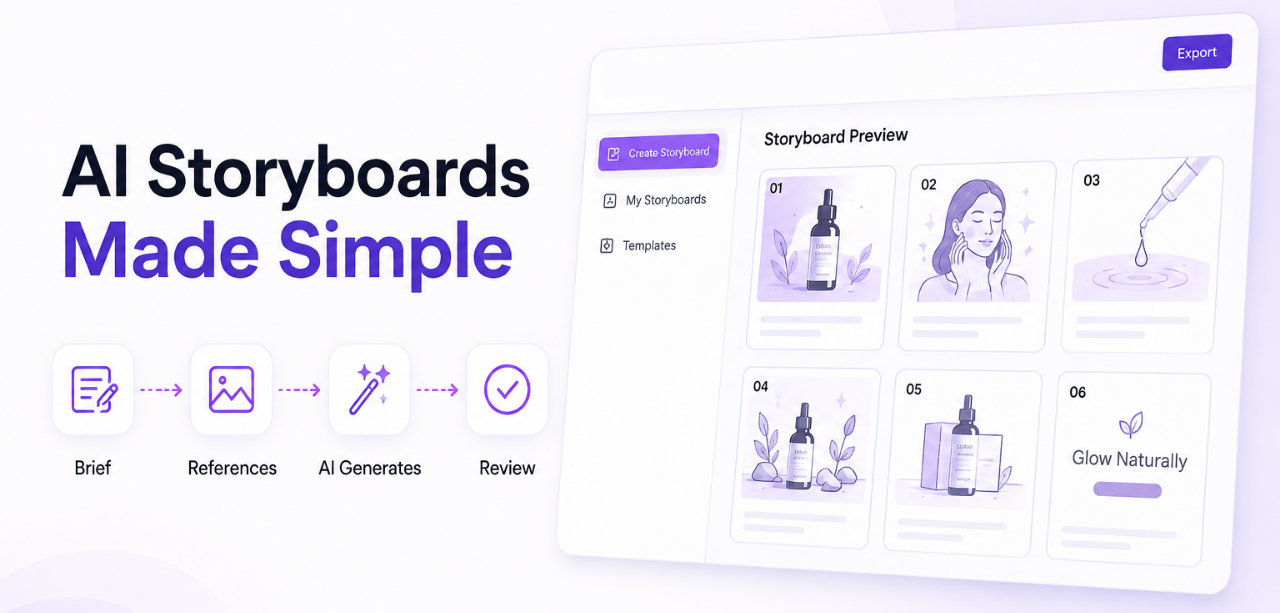
Most marketing teams know the feeling. A campaign deadline is approaching, the brief keeps changing, and everyone on the team has a different vision for the ad. Someone jumps straight into an AI video generator hoping for a shortcut, only to end up with a clip that doesn’t match the brand, the message, or the client’s expectations. Then the revisions start.
This is the real bottleneck in modern ad creation. It isn’t a lack of AI tools — it’s a lack of planning before those tools are used. Teams skip the one step that has always separated a strong ad from a forgettable one: the storyboard.
This is exactly the gap Dilogs AI was built to close. Dilogs is an AI-powered storyboard platform that helps marketing teams, agencies, and creators visualize an ad concept before a single frame of video is generated. Instead of gambling on a fully rendered clip, teams get a structured, editable storyboard first — and only move to production once everyone has signed off.
Dilogs AI is an AI storyboard generator built specifically for advertising and marketing teams. It was created to solve a problem most AI video tools ignore: video generation without planning almost always produces content that needs to be redone.
Rather than generating a finished video from a single prompt, Dilogs AI focuses on the pre-production stage. It takes a creative brief and turns it into a structured, scene-by-scene storyboard — camera angles, shot flow, and visual composition included. This is the core difference between storyboard generation and video generation: one produces a plan your team can review and refine, while the other produces a final output you’re stuck with.
By treating storyboarding as its own discipline rather than an afterthought, Dilogs AI gives creative teams a shared, visual reference point long before production budgets are committed.
Storyboarding has been the backbone of great advertising for decades, long before AI entered the picture. AI storyboarding simply makes that process faster and more accessible. Here’s why it still matters:
Consider an agency pitching three campaign directions to a client. Instead of describing each concept in a meeting, they can show three distinct AI-generated storyboards side by side. The client picks a direction in one call instead of three rounds of back-and-forth.
The process starts with a simple creative brief. Users describe the product, brand, campaign goal, target audience, tone, key message, and call-to-action. This is the foundation Dilogs AI’s storyboard generator uses to shape every scene, so a clear, specific brief produces a noticeably stronger storyboard.
Next, users can upload product images or visual references. These give the AI a concrete understanding of what the product actually looks like, rather than relying on text description alone. Reference images consistently improve storyboard accuracy, especially for product-focused ads.
Dilogs AI supports common formats including 16:9, 9:16, and 1:1, so the storyboard is built for the platform it will actually run on — YouTube and LinkedIn typically favor 16:9, Instagram Reels and TikTok favor 9:16, and Facebook feeds often perform well in 1:1.
Once the brief, references, and format are set, Dilogs AI analyzes the campaign objective and creative direction to build a sequential storyboard. This includes scene descriptions, camera angles, visual composition, and overall shot flow. The result is a structured visual plan — not a single random video clip.
From here, teams can edit prompts, improve individual scenes, adjust creative direction, and fine-tune messaging. Because the output is a storyboard rather than a finished video, changes are fast and don’t require regenerating an entire clip. Teammates can collaborate on the same storyboard directly.
Finally, the storyboard is shared for approval. Stakeholders sign off on the plan before any production resources are spent, which is where most of the time and cost savings come from. Approving a storyboard is far faster than approving — and re-approving — a finished video.
The clearest way to understand Dilogs AI is to compare it with traditional AI video generators that skip planning altogether.
| Traditional AI Video Tools | Dilogs AI |
| Generates videos immediately | Generates a storyboard first |
| Difficult to edit mid-process | Easy to refine scene by scene |
| Often random, unpredictable outputs | Structured, intentional creative workflow |
| More revisions after production starts | Better planning before a single frame is shot |
| Little room for team collaboration | Built for team review and feedback |
| Production begins immediately | Approval happens before production |
Dilogs AI’s storyboard-first workflow fits any team that creates ads or marketing videos regularly:
AI adoption in marketing is accelerating, and the demand for scalable creative workflows is growing with it. Teams are under pressure to produce more content, faster, without sacrificing quality. But speed without planning just produces more content to redo.
AI storyboarding is emerging as the missing link between creative strategy and AI-powered execution — a way to move quickly while still thinking through every scene. As more brands rely on AI for video production, the ones that pair it with structured planning are the ones producing ads that actually convert.
Dilogs AI sits at exactly that intersection: fast enough to keep up with modern content demands, and structured enough to protect creative quality.
Dilogs AI simplifies the journey from creative idea to production-ready storyboard. By generating a structured, editable storyboard before any video is produced, it helps marketers move from concept to approval faster, collaborate more effectively, cut down on revisions, and ultimately build stronger advertising campaigns.
If your team is still jumping straight into AI video generation and hoping for the best, it’s worth trying a different starting point. Explore Dilogs AI and see what a smarter, storyboard-first approach to AI-powered ad creation looks like.
Q: What is an AI storyboard generator?
Ans: An AI storyboard generator uses artificial intelligence to turn a written creative brief into a sequence of visual scenes — including shot composition and camera direction — before any video is produced.
Q: How is Dilogs AI different from AI video generators?
Ans: Traditional AI video generators produce a finished clip directly from a prompt. Dilogs AI produces a structured, editable storyboard first, so teams can review and approve the concept before committing to full video production.
Q: Do I need design or filmmaking experience to use Dilogs AI?
Ans: No. Dilogs AI is built for marketers, not just filmmakers. A clear creative brief is enough to generate a professional storyboard.
Q: What aspect ratios does Dilogs AI support?
Ans: Dilogs AI supports common formats including 16:9, 9:16, and 1:1, covering platforms like YouTube, Instagram Reels, TikTok, Facebook, and LinkedIn.
Q: Can I edit a storyboard after it’s generated?
Ans: Yes. Users can edit prompts, refine individual scenes, adjust creative direction, and collaborate with teammates before final approval.
Q: Who benefits most from AI storyboarding?
Ans: Marketing agencies, freelancers, creative studios, startups, ecommerce brands, performance marketers, and in-house marketing teams all benefit from planning ad concepts before production.
Q: Does storyboarding first actually save money?
Ans: Yes. Approving a storyboard before production significantly reduces reshoots, wasted generation credits, and revision cycles — all of which add to production costs.